This post is the architecture writeup for a customer support agent we built for a mid-market SaaS company. Names and numbers have been adjusted for confidentiality, but the design decisions are real, the tradeoffs are real, and the system is currently handling a five-figure number of tickets a week in production. If you're considering a multi-agent architecture for a similar problem, this is the kind of detail you actually need to make the decision.
A note before the deep dive: we did not start from "build a multi-agent system." We started from a problem and an evaluation set, and the architecture became multi-agent over four iterations because single-agent kept hitting walls. The choice was earned. If you're skipping straight to multi-agent because it's interesting, you're going to overspend.
The problem
A B2B SaaS company with about 4,000 customers and a five-person support team. Inbound tickets had grown 40% year over year, but headcount had not. Roughly 70% of tickets fell into a recurring set of categories — billing questions, login issues, integration setup help, plan changes, and "how do I do X" workflow questions. The remaining 30% were genuinely novel and required engineering or product knowledge.
The goal: resolve the 70% end-to-end without a human, hand off the 30% with full context to a human agent. Hard constraints: never invent account information, never take an action on the wrong account, never make a billing change without explicit user confirmation, and stay below a target cost per ticket.
What we tried first (and why it failed)
Iteration 1: a single LLM with tools. One large model, a system prompt covering all five ticket categories, function-calling for the database lookups and ticket actions. This is the architecture we always start with, because if it works the project is a tenth the cost.
It did not work. The system prompt grew to 4,000 tokens trying to cover every category and every edge case. Latency was fine, accuracy was middling, and the failure mode was telling: the model would correctly identify the category but then mis-execute the resolution because the prompt's instructions for one category bled into another. We were also paying premium-model rates for what should have been a cheap classification step.
Iteration 2: a router plus a single solver. We added a small fast model out front to classify the ticket category, then routed to a single solver model with a category-specific prompt. Better — the bleed-through stopped — but the solver still struggled with the complex categories (integration setup, plan changes), and we couldn't make the prompt good for the easy categories without making it worse for the hard ones.
Iteration 3: a router plus N specialist solvers. One specialist per category. Each with its own prompt, its own tool subset, and its own eval set. This worked. The resolution rate jumped from 58% to 81% on the eval set in a week. We were ready to ship.
Except: about 7% of tickets touched two categories. A user asks about a billing issue and an integration question in the same email. The router picked one or the other and we lost half the answer.
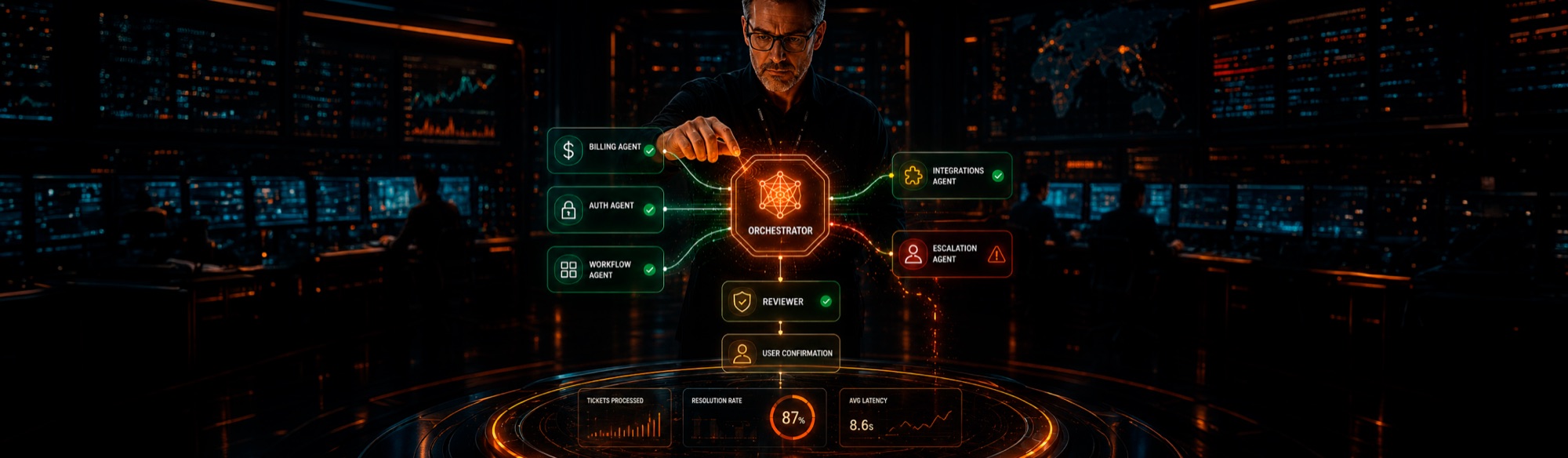
Iteration 4: the architecture we shipped. A router-orchestrator-specialists topology, with explicit handoff and a final reviewer. This is the system we deployed to production. It hit 87% resolution on the eval set, 84% in the first month of production traffic, and stays under the cost target.
The shipped architecture, end to end
A ticket enters the system and passes through six stages.
1. Ingestion and normalization. The raw ticket is parsed for sender identity, attachment count, language, and any thread history. We resolve the sender to a customer record and load a compact account context — plan tier, ticket history summary, current billing state, recent product usage. This is plain code, no model call. It produces a structured object that every later stage operates on.
2. Triage classifier. A fast small model — Haiku-tier — runs a single classification call: which categories does the ticket touch (multi-label), what's the urgency, and is it likely resolvable without human escalation. Output is a strict JSON schema. This call costs fractions of a cent, runs in under 500ms, and gates everything downstream. If urgency is high or "likely human-required" is true, the ticket goes straight to the human queue with the structured context attached.
3. Specialist agents. For each category the triage flagged, we run a specialist agent in parallel. Each specialist has:
A focused system prompt (~800 tokens, not 4,000)
A subset of tools relevant to its domain (the billing specialist can read invoices and propose plan changes; it cannot modify integration settings)
Its own eval set, owned by the team responsible for that category
Its own prompt versioning track
A specialist can return three outcomes: a resolved answer with citations, a partial answer with a request for orchestrator help, or an escalation to human. Each specialist is independently improvable — the integration team can iterate on the integration specialist without touching billing.
4. Orchestrator. When more than one specialist returned an answer, an orchestrator agent synthesizes them into a single coherent reply. The orchestrator does not re-do the work; it stitches the specialists' outputs together, resolves any conflicts (which is rare), and produces the user-facing draft. The orchestrator has no tools — it can't take an action — to keep failure modes simple.
5. Reviewer. A second-pass model checks the orchestrator's draft against a checklist: does it cite real account data correctly, does it propose any action that requires explicit user confirmation, does it stay within the policy boundaries, does the tone match the brand voice. Reviewer failures send the ticket to the human queue with the draft attached for editing. Reviewer passes send the draft into the user-facing reply pipeline.
6. Action confirmation. Any action that mutates state (plan change, refund, integration credential reset) is never taken by the agents. The reply contains a confirmation link or button; the user explicitly confirms; only then does a deterministic backend service execute the action. The agents propose; the user confirms; code executes. This is the single most important design rule in the system.
Why this architecture and not the cool ones
A few choices look conservative against current fashion. Each was deliberate.
No emergent agent-to-agent chatter. The popular "agents debating with each other in natural language" pattern is fun in demos and unstable in production. Our specialists don't talk to each other. The orchestrator reads their structured outputs and stitches. Communication between agents is JSON, not English.
Strict tool boundaries. Each agent has the minimum tools it needs. Billing specialist cannot reset an integration. Integration specialist cannot view invoice line items. The blast radius of a misbehaving agent is bounded by its tool list.
No autonomous actions. This was non-negotiable for a customer-facing system. The agent system recommends; it does not execute anything that touches money, identity, or external systems. We trade some automation surface for a vastly simpler safety story.
Explicit human handoff with full context. The 13–16% of tickets that escalate go to a human queue with the entire agent transcript, structured account context, and the draft reply already written. The human is editing, not starting from zero. This was where most of the time savings actually came from — even the "we couldn't fully automate" cases got resolved 4x faster.
The numbers
Cost per ticket (model spend only): comfortably inside the target. The triage call is the cheapest; specialists running in parallel dominate; the reviewer is a small overhead. Caching account-context templates and specialist prompts cut cost by another ~30%.
Latency: median 9 seconds end-to-end (most of which is the specialists running in parallel; serial would have been 25+ seconds). p95 is 18 seconds. For email-style tickets this is invisible to the user; for live chat we'd reconsider the architecture.
Resolution rate: 84% in the first month, climbing to 88% by month three as we tightened specialist prompts and grew the eval sets.
User satisfaction (CSAT) on agent-resolved tickets: matched human-resolved tickets within statistical noise. Surprisingly, response speed moved CSAT up enough to offset the small handful of cases where the agent's answer was correct but tonally a touch flat.
What we'd do differently
Two honest regrets.
We built the orchestrator before the specialists were stable. When a specialist regresses, the orchestrator inherits the regression and it's hard to localize. We should have made each specialist a fully independent service first, with its own production deployment, and only added orchestration once each was solid.
We undercaptured edge cases for two months. The first eval set was 80% common cases and 20% edge cases. Production traffic taught us we'd inverted the distribution that mattered — the edge cases were where we had to be careful, and the common cases were where the system was already strong. We rebuilt the eval set after month two with a heavier weight on edges. Quality jumped.
Whether to use this architecture
This architecture is appropriate when:
You have multiple distinct categories of work that don't share a single mental model
Each category has its own knowledge, tools, and people who care about it
You can phase actions through human confirmation
You can afford 5–20s latency
It is wrong when:
A single specialist + one prompt would work (most cases)
The work is real-time conversational
The categories aren't actually separable on inspection
You can't afford the multi-call cost profile
Multi-agent is a tool. Like every tool, it's powerful when applied to the right problem and an expensive way to feel sophisticated when applied to the wrong one. The version of this system we shipped is, in the end, a fairly boring software architecture: a router, some workers, an aggregator, a reviewer, and a confirmation step. The "agent" part is the model calls. The "system" part is everything else, and that's where the value lives.
Have a use case where multi-agent might actually be the right answer? We'll tell you honestly whether it is. Book a 30-minute architecture review and we'll sketch the simplest design that meets your requirements.